AI Chatbot Integration
Integrate an intelligent assistant to query Slurm status and generate scripts.
The Slurm Dashboard includes a powerful AI Chatbot that leverages Large Language Models (LLMs) to assist users with cluster management tasks. The entire assistant — system prompt, available tools, cluster defaults, and behavioral rules — is driven by a single YAML configuration file, so administrators can customize the AI without touching application code.
Features
- Natural Language Queries: Ask about node status, job details, partition information, reservations, and QoS.
- Script Generation: Automatically generate
sbatchscripts using live cluster data (partitions, QoS, defaults). - Workflow Tools: Multi-step diagnostic tools like job troubleshooting, node health checks, and sbatch helpers.
- Custom Tools: Define your own tools in YAML that call Slurm REST, SlurmDB, or external HTTP APIs.
- Context Awareness: The AI understands your cluster's specific configuration, defaults, and policies.
- Restricted Topics: Redirect off-topic questions to support contacts or documentation.
- Interactive UI: A modern chat interface with rich tool-result cards and suggested follow-up questions.
Architecture
The chatbot implementation consists of four main parts:
- YAML Configuration (
infra/llm-assistant.yaml): Defines everything — system prompt, cluster identity, tools, defaults, and restrictions. - Config Library (
lib/llm-config.ts): Loads and caches the YAML, builds AI SDK tools and the system prompt dynamically. - API Route (
app/api/chat/route.ts): Streams LLM responses using tools and prompt built from the config. - UI Components (
components/llm/*): Renders the chat interface, tool-result cards, and messages.
Configuration
1. Environment Setup
Configure the following environment variables in your .env file:
# Base URL for the LLM provider (OpenAI compatible)
OPENAI_API_URL="https://api.openai.com/v1"

# The main model for chat (e.g., gpt-4o, gpt-4o-mini, qwen-2.5-72b)
OPENAI_API_MODEL="gpt-4o-mini"

# A faster model for generating suggestions (optional)
OPENAI_API_MODEL_SUGGESTION="gpt-4o-mini"

# Your API key
OPENAI_API_KEY="sk-..."

# Path to the LLM assistant YAML config (optional, defaults to infra/llm-assistant.yaml)
LLM_CONFIG_PATH="infra/llm-assistant.yaml"
2. YAML Configuration File
All AI assistant behavior is defined in infra/llm-assistant.yaml. This file is loaded once and cached for 60 seconds; changes take effect automatically without a server restart.
Cluster Identity
cluster:
  name: My HPC Cluster
  description: General-purpose high-performance computing cluster
  organization: My University
  documentation_url: https://docs.example.com
  support_email: hpc-support@example.com
  notes: |
    This cluster has 200 CPU nodes and 40 GPU nodes.
    GPU nodes require the 'gpu' partition.
System Prompt
system_prompt: |
  You are a specialized Slurm HPC assistant.
  Your ONLY purpose is to assist users with Slurm workload manager tasks,
  HPC cluster operations, and related scripting.

  CRITICAL RULES:
  - REFUSE any questions unrelated to Slurm, HPC, or Linux.
  - NEVER fabricate data. Only state facts from tool results.
  - After a tool call, provide ONLY actionable recommendations.
Job Defaults
These defaults are injected into the system prompt so the AI suggests them when users don't specify values:
defaults:
  partition: general
  qos: normal
  walltime: "01:00:00"
  nodes: 1
  ntasks_per_node: 1
  mail_type: END,FAIL
  output_pattern: "%x_%j.out"
  error_pattern: "%x_%j.err"
Custom Instructions
custom_instructions: |
  - Always remind users to load required modules before running programs.
  - Suggest 'squeue -u $USER' to check job status.
  - Recommend 'sacct' for checking historical job data.
Restricted Topics
Redirect off-topic queries to the appropriate channel:
restricted_topics:
  - topic: account creation
    redirect: Please contact the HPC support team to request a new account.
  - topic: storage quota increases
    redirect: Storage quota requests must be submitted through the IT ticketing system.
3. Tools
Tools are the core of the assistant's capabilities. Each tool is defined in the tools array of the YAML config.
Built-in Tools
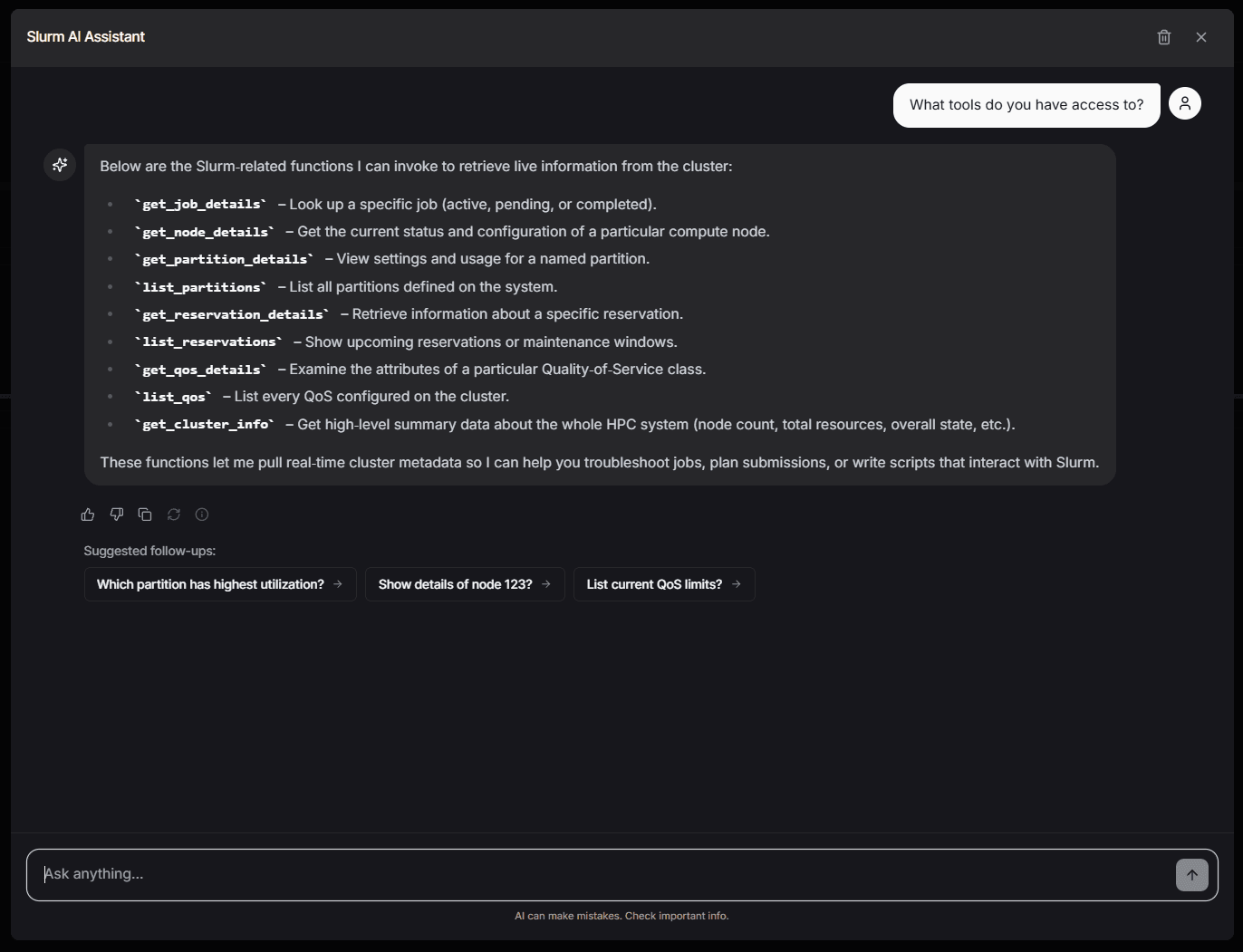
These tools have optimized multi-step executors built into the application:
| Tool ID | Category | Description |
|---|---|---|
get_job_details | jobs | Get job details (active → historical fallback) |
get_node_details | nodes | Get node status and resources |
get_partition_details | partitions | Get partition configuration and limits |
get_reservation_details | reservations | Get reservation details |
list_reservations | reservations | List all reservations and maintenance windows |
get_qos_details | qos | Get QoS limits and configuration |
get_cluster_info | cluster | Get cluster-wide status |
list_qos | qos | List all QoS levels |
list_partitions | partitions | List all partitions |
Workflow Tools
Workflow tools orchestrate multiple API calls to provide comprehensive analysis:
| Tool ID | Description |
|---|---|
troubleshoot_job | Diagnoses failed/pending jobs by gathering job details, partition state, and node health in one call |
sbatch_helper | Fetches partitions, QoS, and cluster info to write informed sbatch scripts |
node_health_check | Checks node health, resources, current jobs, and cluster context |
Tool Configuration Example
Each tool supports prompt_guidance to control how the AI interprets results:
tools:
  - id: troubleshoot_job
    name: Troubleshoot Job
    description: >
      Diagnose why a job failed, was cancelled, or is stuck pending.
    enabled: true
    builtin: true
    category: workflows
    parameters:
      - name: job
        type: string
        description: The Job ID to troubleshoot
        required: true
    prompt_guidance: |
      Jump directly to your diagnosis:
      1. Start with the job state and exit code interpretation
      2. FAILED: check for OOM (exit 137), segfault, missing module
      3. TIMEOUT: compare runtime vs requested walltime
      4. PENDING: explain the Slurm reason in plain language
      5. End with 3-5 specific actionable recommendations
Custom Tools
You can define custom tools that call Slurm REST, SlurmDB, or external HTTP APIs. Set builtin: false and provide an execution block:
  - id: get_account_usage
    name: Account Usage
    description: Get usage stats for a Slurm account
    enabled: true
    builtin: false
    category: accounting
    parameters:
      - name: account
        type: string
        description: The Slurm account name
        required: true
    execution:
      type: slurmdb
      endpoint: /accounts/{account}
      error_message: Could not retrieve account data
    prompt_guidance: |
      Summarize the account's resource usage and any limits.
Execution types:
slurm— Calls the Slurm REST API (e.g.,/nodes,/job/{id})slurmdb— Calls the SlurmDB REST API (e.g.,/accounts/{name},/qos)http— Calls any external HTTP endpoint with configurable method and headers
Parameters use {param} placeholders in the endpoint URL that are interpolated at runtime.
4. Implementation Details
The core logic is distributed across the following files:
YAML Config (infra/llm-assistant.yaml)
The single source of truth for all assistant behavior: system prompt, cluster identity, tool definitions, defaults, custom instructions, and restricted topics.
Config Library (lib/llm-config.ts)
Loads the YAML config, builds Zod input schemas for each tool, resolves built-in executors or creates custom executors from the execution block, and assembles the full system prompt. The config is cached for 60 seconds.
API Route (app/api/chat/route.ts)
Calls loadLLMConfig() and buildToolsAndPrompt() to get the tools and system prompt dynamically. Uses AI SDK's streamText with stepCountIs(5) to limit tool-call loops and prepareStep to force tool calls on the first step (preventing hallucination before tools return).
LLM Config API (app/api/llm-config/route.ts)
Admin-only REST API for reading and updating the YAML config:
GET /api/llm-config— Returns the current config as JSON + raw YAMLPUT /api/llm-config— Saves updated config (accepts raw YAML or structured JSON)
UI Components (components/llm/*)
- ChatList (
chat-list.tsx): Renders messages with automatic markdown table stripping (tool cards display all data). - Message Components (
message.tsx): User and bot message components. - Tool Invocation (
tool-invocation.tsx): Rich visual cards for tool results, including workflow tools (troubleshoot_job,sbatch_helper,node_health_check). - Empty State (
empty-state.tsx): Initial view with suggested queries.
Usage
Once configured, the AI Assistant can be accessed via the dashboard interface.
Example Queries
Check Node Status
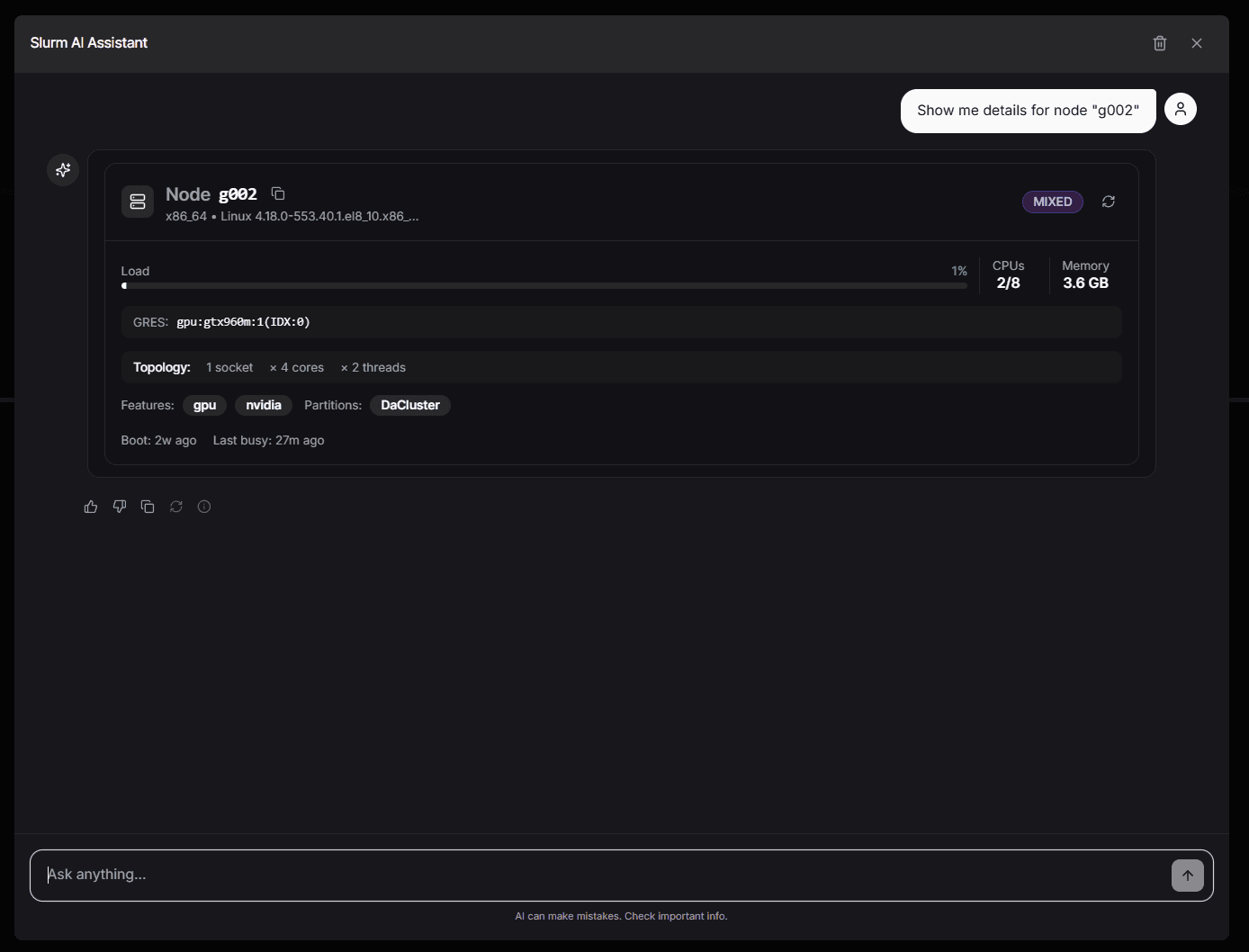
User: "Show me details for node 'sdg051'"
AI: Returns a structured card showing System Load, Memory, Partitions, and GRES usage.
Generate Scripts
User: "Help me write an sbatch script for a 4-GPU training job"
AI: Fetches available partitions and QoS, then generates a tailored sbatch script using your cluster's defaults.
Troubleshoot a Job
User: "Why did job 1234567 fail?"
AI: Runs the troubleshoot_job workflow — fetches job details, partition state, and node health — then provides a diagnosis with actionable recommendations.
Node Health Check
User: "Is node gpu01 healthy?"
AI: Runs the node_health_check workflow — fetches node state, resource utilization, current jobs, and partition context.
Admin Configuration Panel
The LLM assistant can also be configured through the Admin Dashboard under the LLM Config tab. This visual editor allows you to:
- Edit cluster identity, system prompt, and custom instructions
- Enable/disable individual tools
- Create and configure custom tools with execution endpoints
- Define restricted topics and redirect messages
- Switch between structured editing and raw YAML editing
- Test changes with the built-in chat preview
Changes saved through the admin panel are written to infra/llm-assistant.yaml and take effect within 60 seconds (or immediately on the next request after cache expiry).
For more details on the admin panel, see Admin Dashboard — LLM Config.
Customization
System Prompt
Customize the system prompt in infra/llm-assistant.yaml under the system_prompt key. This controls the AI's personality, rules, and formatting preferences. Changes take effect automatically without a server restart.
Default Suggestions
To update the default suggestions shown in the empty chat state, modify the starters array in components/llm/empty-state.tsx.
const starters = [
  {
    heading: "Node Details",
    message: 'Show me details for node "sc020"',
  },
  {
    heading: "Job Details",
    message: 'Show me details for job "12345"',
  },
  // Add your own suggestions here
];